

AI is moving fast. New tools launch every week, trends change, and it’s easy to feel lost. AI-Diggers exists to make AI simple, useful, and practical—without fluff. Here you’ll find AI tools, deep guides, and clear pathways for students, creators, job seekers, and businesses.
The Practical Era of Artificial Intelligence
A few years ago, AI felt like a “future thing.” Now it’s already part of daily work—writing, designing, studying, research, customer support, marketing, and automation.
But here’s the problem: most people don’t need more hype. They need clarity:
- Which AI tools are actually useful?
- What can AI do well today—and what can’t it do?
- How do you use it safely (privacy and data)?
- How do you learn AI without wasting months?
That’s why AI-Diggers is built like a resource hub, not just a blog. You’ll see categories that match real-life needs: AI Tools, AI for Students, AI for Business, AI Jobs, and Beginner Guides—so you can jump directly to what matters.
We’ll also cover major AI updates when they matter (for example: new models, tool launches, or big changes). But we don’t publish “noise.” We publish what the update means, who it helps, what to try, and what to avoid.
What AI Really Is (In Simple Words)
Artificial intelligence is software that can learn patterns from data and use those patterns to produce results—like text, images, summaries, or predictions.
Today, most people interact with generative AI. This includes tools that can:
- write and rewrite text
- summarize documents
- create images and videos
- help with coding
- answer questions
- automate tasks
Many of these tools are built on large language models (LLMs). LLMs are great at language, but they can also make mistakes. Sometimes they “hallucinate” (confidently say something wrong). That’s why the best AI use is not blind trust—it’s smart workflows: prompts, checks, sources, and real testing.
On AI-Diggers, we don’t just say “AI can do everything.” We focus on:
- real use cases
- tool strengths + tool limits
- practical steps you can follow
- safe and responsible usage
Google also values content that shows experience and trust, especially for helpful topics and recommendations. Google’s own guidance highlights Experience as part of E-E-A-T (Experience, Expertise, Authoritativeness, Trust).
What You’ll Find on AI-Diggers (Our Topic Map)
This is the map of our site. Think of each section as a “pillar.” Every pillar will grow into a full cluster of deep articles, comparisons, and step-by-step guides.
AI Tools (Reviews, comparisons, and “best for” guides)
This is where we cover the AI tools ecosystem: writing tools, image tools, video tools, productivity tools, chatbots, and more. We’ll publish:
- best AI tools by use case
- tool comparisons (A vs B)
- pricing and plan breakdowns
- alternatives (free and paid)
- setup guides and workflows
Explore: AI Tools (link to your AI Tools pillar/category page)
AI for Students & Education
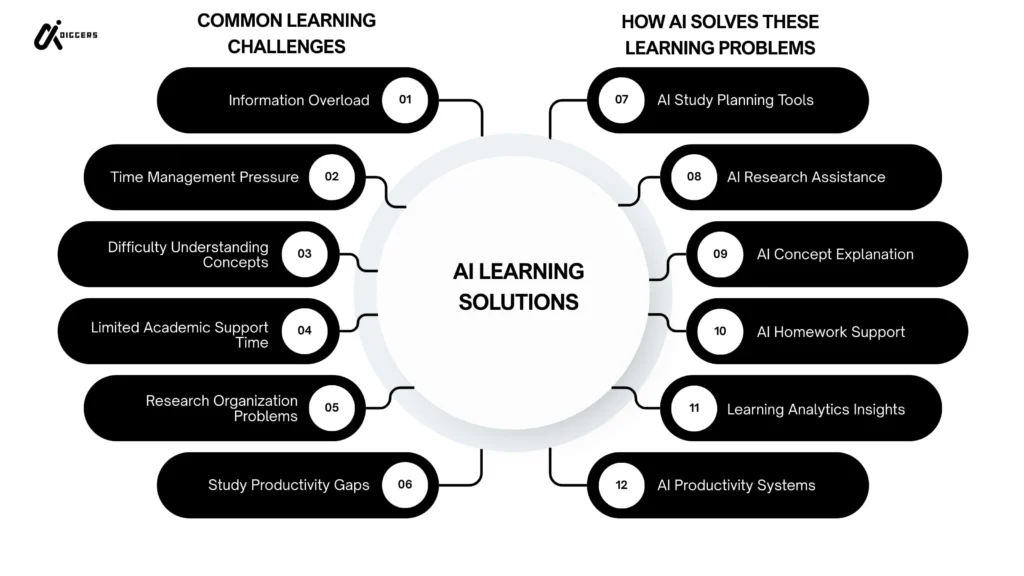
Students want AI help for learning—not shortcuts that cause trouble. Here we cover:
- AI study workflows
- research and note-taking systems
- writing support (with ethics)
- AI tools that help learning
Explore: AI for Students & Education
AI for Business & Work
This is about productivity and automation:
- AI for customer support
- content workflows
- AI automation ideas
- AI tools for teams
Explore: AI for Business & Work
AI Jobs & Career
AI is changing careers—and creating new ones. This section covers:
- AI career paths
- in-demand skills
- portfolios and projects
- job search strategies using AI
Explore: AI Jobs & Career
AI Beginner + Practical Guides
If you’re starting from zero, this is where you begin:
- what AI is
- how to use AI tools
- prompt basics
- simple guides and checklists
Explore: AI Beginner Guides
The AI Tools Ecosystem: Categories, Capabilities, and Limitations
Artificial intelligence tools are no longer limited to research labs or tech companies. Today, AI tools are practical, accessible, and designed for everyday use. But the ecosystem is large — and confusing.
That’s why understanding the structure of AI tools is important.
1. AI Writing Tools
AI writing tools are powered by large language models (LLMs). They help generate text, summarize documents, rewrite content, brainstorm ideas, and even assist with coding.
Common use cases include:
- Blog writing
- Email drafting
- Academic research summaries
- Social media content
- Resume building
- Script writing
But writing tools are not perfect. They can:
- Produce incorrect facts (hallucinations)
- Sound generic without proper prompting
- Struggle with niche expertise
- Repeat patterns
That’s why learning prompt structure and verification methods matters.
2. AI Image Generators
Image generation tools use diffusion models and neural networks trained on large image datasets.
They can create:
- Digital art
- Product mockups
- Concept visuals
- Marketing graphics
- Book covers
However, image AI faces:
- Copyright concerns
- Style imitation issues
- Inconsistent realism
- Ethical debates around dataset training
Understanding usage rights is critical before using AI-generated images commercially.
3. AI Video Tools
AI video tools are expanding quickly. They can:
- Generate short clips
- Convert text into video
- Create AI avatars
- Edit video automatically
- Add subtitles instantly
But limitations still exist:
- Rendering quality varies
- Longer video generation is complex
- Motion accuracy isn’t perfect
Video AI is powerful — but still evolving.
4. AI Chatbots and Conversational Systems
AI chatbots use natural language processing (NLP) to simulate conversation.
They are used in:
- Customer support
- Research assistance
- Study help
- Workflow automation
- Coding help
Important limitations include:
- Outdated knowledge in some models
- Data privacy concerns
- Overconfidence in incorrect answers
AI chatbots should assist thinking — not replace critical thinking.
5. AI Productivity and Automation Tools
Many AI platforms now focus on automation:
- Task scheduling
- Email filtering
- Meeting summarization
- CRM automation
- Workflow integrations
These tools save time — but require careful configuration to avoid automation errors.
Pricing Models and Free vs Paid AI Tools
Most AI tools operate under:
- Subscription models
- Token-based usage
- Freemium tiers
- API-based pricing
Free tools are good for experimentation. Paid tools offer:
- Higher token limits
- Priority processing
- Better integrations
- Team features
Choosing tools depends on:
- Budget
- Purpose
- Scale
- Required accuracy
AI Tool Limitations Everyone Should Understand
Artificial intelligence is powerful — but not magic.
Key limitations include:
- Hallucinations (confident but false information)
- Bias from training data
- Token limitations (context memory size)
- Data privacy risks
- Over-automation risks
A strong AI workflow always includes:
- Human verification
- Fact-checking
- Prompt refinement
- Clear use-case boundaries
Artificial Intelligence in Education and Learning
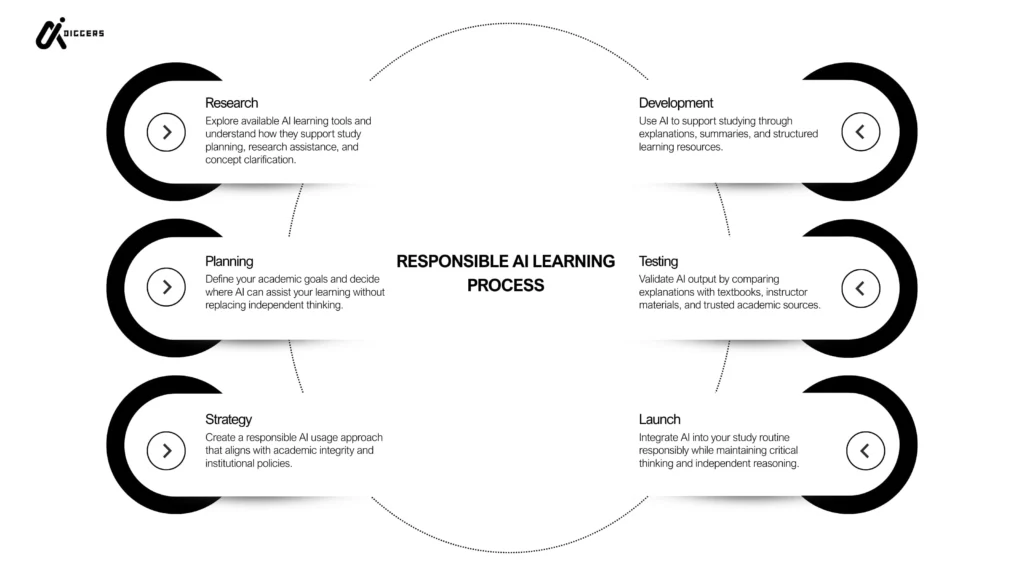
AI is changing how students learn — but it should enhance education, not replace it.
Students use AI for:
- Research summaries
- Brainstorming ideas
- Explaining difficult topics
- Creating study plans
- Language learning
However, ethical usage matters.
Over-reliance on AI can reduce:
- Critical thinking
- Writing development
- Independent research skills
The best approach is:
AI as assistant, not substitute.
Learning how to question AI output is just as important as generating it.
Educational institutions are also exploring AI for:
- Personalized tutoring
- Adaptive learning systems
- Academic support tools
AI in education is evolving rapidly — and understanding its responsible use is essential.
AI in Business and the Workplace
Businesses are adopting AI for efficiency, cost reduction, and competitive advantage.
Common applications include:
- Marketing automation
- Content generation
- Data analysis
- Chatbot customer support
- Sales forecasting
- Workflow optimization
AI can increase productivity significantly.
But implementation challenges include:
- Integration complexity
- Data security concerns
- Training employees
- Workflow redesign
Companies that succeed with AI focus on:
- Clear use-case implementation
- Measurable ROI
- Human-AI collaboration
- Continuous improvement
AI is not a replacement for employees — it is a productivity amplifier.
Careers in Artificial Intelligence
AI is creating new career paths while reshaping traditional roles.
Technical roles include:
- Machine learning engineer
- Data scientist
- AI researcher
- NLP specialist
- Prompt engineer
Non-technical roles include:
- AI product manager
- AI policy advisor
- AI marketing strategist
- AI workflow consultant
Skills that matter in AI careers:
- Data literacy
- Problem solving
- Critical thinking
- Basic programming (Python)
- Understanding of AI systems
The AI job market is growing — but skills matter more than hype.
Continuous learning is required in this field.
Risks, Ethics, and Responsible AI Use
Artificial intelligence raises serious questions:
- Bias in decision systems
- Data misuse
- Misinformation risks
- Job displacement concerns
- Intellectual property issues
Responsible AI use requires:
- Transparency
- Human oversight
- Ethical guidelines
- Regulatory awareness
Understanding risks builds credibility — and trust.
Ignoring them damages authority.
The Future of Artificial Intelligence
AI development is accelerating.
Key areas shaping the future include:
- More advanced language models
- Multimodal AI (text + image + video combined)
- Better reasoning systems
- AI regulation frameworks
- Automation expansion across industries
The debate around Artificial General Intelligence (AGI) continues.
But in the short term, the focus is clear:
Practical AI that improves real-world productivity.
Start Exploring AI-Diggers
Artificial intelligence is not one topic.
It is an ecosystem.
You can start by exploring:
- AI Tools
- AI for Students
- AI for Business
- AI Jobs & Career
- Beginner AI Guides
Each section is structured to go deeper — step by step.
AI-Diggers is built to help you navigate this ecosystem clearly, responsibly, and practically.
How to Choose the Right AI Tool (Practical Framework)
With hundreds of AI tools available, choosing the right one can feel overwhelming.
Instead of asking “What is the best AI tool?”, ask:
- What problem am I solving?
- Do I need speed or accuracy?
- Is privacy important?
- Do I need integrations?
- Is this for personal or business use?
Here is a simple decision framework:
Step 1: Define Your Use Case
Writing? Image creation? Research? Automation?
Step 2: Determine Your Level
Beginner → choose simple UI tools
Advanced → look for customization and API access
Step 3: Check Data Policies
Some AI tools store conversations. Others offer privacy modes.
Step 4: Compare Pricing Models
Free tier vs subscription vs token-based usage.
This structured approach prevents tool overload and helps you use AI strategically.
Common Mistakes People Make With AI
AI is powerful — but misuse is common.
Here are common mistakes:
- Blindly trusting AI output
- Not verifying facts
- Using weak prompts
- Ignoring privacy settings
- Over-automating processes
- Replacing thinking instead of enhancing it
Smart AI usage always includes human oversight.
AI is an assistant — not a decision-maker.
Prompt Engineering Basics
One of the most underrated AI skills is prompt engineering.
A weak prompt produces weak results.
A structured prompt includes:
- Clear task definition
- Context
- Output format
- Constraints
- Example (if needed)
Example structure:
“Act as a marketing strategist.
Create a 5-step campaign plan for a SaaS AI tool targeting students.
Keep it concise and structured.”
Better prompts = better outputs.
Prompt clarity is a competitive advantage.
How AI Is Changing Productivity
AI doesn’t just save time.
It changes how we work.
Examples:
- Writers brainstorm faster
- Students understand topics quicker
- Businesses automate repetitive tasks
- Developers debug code faster
The biggest benefit of AI is:
Cognitive acceleration.
It reduces friction between idea and execution.
Understanding AI Limitations (Deep Dive)
AI systems are trained on massive datasets.
But they:
- Don’t “understand” meaning like humans
- Predict patterns, not truth
- Can generate convincing errors
- Reflect biases from training data
Understanding these limitations makes you smarter than most users.
Responsible AI usage is not optional — it’s necessary.
Why Structured AI Knowledge Matters
Random AI exploration leads to confusion.
Structured learning leads to mastery.
AI-Diggers is built around:
- Category clusters
- Pillar guides
- Internal linking structure
- Progressive learning path
Instead of scattered information, you get a roadmap.
That roadmap builds authority — both for users and for search engines.
Refrence: Wikipedia, Google Scholar