

What Using AI Actually Means Today
A few years ago, artificial intelligence sounded like something from a science fiction movie.
People imagined robots replacing jobs or complex systems that only engineers could understand.
But the reality today is very different.
AI has quietly become a practical digital assistant that millions of people use every day.
Writers use it to organize ideas.
Students use it to understand difficult topics.
Freelancers use it to automate repetitive tasks.
Businesses use it to speed up workflows.
Instead of replacing humans, most modern AI tools work as productivity partners.
They help you:
- analyze information faster
- generate ideas
- automate repetitive work
- organize complex tasks
- improve decision making
In simple terms, using AI means asking a smart system to help you think, research, write, analyze, or automate work.
The Shift From Theory to Practical AI
In the past, artificial intelligence mostly existed inside large companies.
Tech companies used machine learning for recommendation systems, search engines, and data analysis.
Today things have changed.
Modern generative AI tools allow anyone to interact with AI through simple chat interfaces.
Instead of programming, people simply describe what they need.
For example:
A student might ask:
“Explain quantum physics in simple terms.”
A marketer might say:
“Write a social media post about eco friendly products.”
A freelancer might request:
“Create a project proposal template.”
The system processes the request and generates a response in seconds.
This shift has made AI accessible to almost everyone.
Why AI Is Becoming a Daily Productivity Tool
Most people spend a large part of their day doing tasks that repeat.
Research
Writing emails
Summarizing information
Brainstorming ideas
Organizing notes
AI tools help reduce the time needed for these activities.
For example:
Instead of reading a 20 page research paper, an AI system can summarize the key ideas.
Instead of struggling with a blank page, an AI writing assistant can generate a starting draft.
Instead of manually organizing information, AI tools can categorize and structure data.
The result is not just faster work.
It is more mental space to focus on important decisions and creative thinking.
The Difference Between Automation and Assistance
One common misunderstanding about AI is the idea that it fully replaces human work.
In most real situations, AI works in two different ways.
AI assistance
This is when AI helps you think, write, research, or brainstorm.
Example:
A writer asking AI for headline ideas.
AI automation
This is when AI performs a task automatically inside a workflow.
Example:
Automatically generating product descriptions for an online store.
Most people start with AI assistance, and later integrate automation when they understand the tools better.
Learning this difference is important.
It helps you use AI as a smart partner, not a blind replacement for human thinking.
The Easiest Way to Start Using AI
Many beginners think they need technical skills to start using AI.
That is not true.
Most modern AI tools are designed to work through simple conversations.
You type a question or request, and the system responds.
The easiest way to start is by using AI for tasks you already do every day.
Choosing Your First AI Tool
There are many AI platforms available today.
Some focus on writing.
Some focus on automation.
Others help with research or coding.
For beginners, it is usually best to start with general purpose AI assistants.
These tools can help with multiple tasks such as:
- writing
- research
- brainstorming
- summarizing information
- answering questions
Once you understand how AI responds to prompts, you can explore more specialized tools.
Understanding Prompts and Instructions
The most important skill when using AI is prompting.
A prompt is simply the instruction you give to the AI system.
Clear prompts usually produce better results.
For example:
Weak prompt
“Write about productivity.”
Better prompt
“Write five practical tips to improve productivity while working from home.”
The second prompt gives the AI clearer direction.
Good prompts usually include:
- context
- clear instructions
- desired output format
This concept is often called prompt engineering, and it becomes more important as you start building AI workflows.
Simple Tasks AI Can Help With Immediately
Beginners should start with tasks that are easy to verify and improve.
Here are a few practical examples.
Research assistance
Ask AI to summarize articles or explain complex topics.
Example prompt:
“Summarize the key ideas from this article in simple language.”
Writing support
Use AI to generate outlines, email drafts, or social media posts.
Example prompt:
“Write a friendly follow up email to a client about a project update.”
Idea generation
AI can help when you feel stuck.
Example prompt:
“Give me ten blog topic ideas about sustainable living.”
Information organization
AI can structure notes or lists.
Example prompt:
“Organize these notes into a clear outline.”
These small tasks help you understand how AI works.
As your confidence grows, you can begin creating larger AI workflows that combine multiple tools and tasks.
How AI Is Used in Everyday Life
Imagine starting your day with a long list of tasks.
Emails waiting to be answered.
Information to research.
Ideas to organize.
Work that needs writing or editing.
Many people now begin these tasks with a simple step.
They open an AI assistant.
Not because it replaces their thinking, but because it reduces friction in everyday work.
AI has quietly become part of daily routines across many professions and lifestyles.
AI for Personal Productivity
One of the most common uses of AI is improving personal productivity.
People often spend time on tasks that require effort but not deep creativity. Writing summaries. Drafting emails. Organizing notes.
AI tools help accelerate these tasks.
For example, instead of manually summarizing a long document, a user might ask an AI assistant:
“Summarize the key points of this report in five bullet points.”
Within seconds, the system produces a structured summary that can be reviewed and refined.
This does not remove human thinking. It simply speeds up the preparation phase.
AI for Organizing Tasks and Schedules
Another everyday use of AI is task organization.
Many professionals manage dozens of small responsibilities during the day.
Meetings
Deadlines
Emails
Research tasks
Content creation
AI powered productivity tools can help structure these activities.
For example:
A user might ask:
“Create a daily work schedule for someone who needs three hours of focused work, two meetings, and time for email.”
The AI generates a structured schedule that can be adjusted as needed.
Some tools even connect with calendars or project management systems, helping automate parts of planning and organization.
AI for Writing, Research, and Information
Writing and research are two areas where AI adoption has grown rapidly.
Students use AI to understand difficult subjects.
Professionals use AI to draft documents.
Content creators use AI to generate outlines and ideas.
Instead of starting with a blank page, users start with a structured draft or explanation.
For example:
A student might ask:
“Explain the causes of World War I in simple terms.”
A marketer might request:
“Create five headline ideas for a product launch campaign.”
AI produces a starting point. The user then reviews, edits, and improves the result.
This approach turns AI into a thinking partner, not a replacement for expertise.
Practical AI Workflows People Use Every Day
Understanding individual AI tasks is helpful.
But the real value of AI appears when people combine several tasks into a workflow.
A workflow is simply a sequence of steps that help complete a goal more efficiently.
AI tools can assist at multiple points in that sequence.
AI Workflow for Personal Productivity
Consider a professional preparing for a meeting.
The traditional process might look like this:
Read background documents
Take notes
Prepare talking points
Draft follow up emails
With AI assistance, the workflow becomes faster.
Step 1: Upload or paste the background document.
Step 2: Ask AI to summarize the key insights.
Step 3: Request a list of discussion points.
Step 4: Generate a follow up email template.
The professional still reviews and adjusts everything, but the preparation time becomes significantly shorter.
AI Workflow for Research and Learning
Students and researchers often use AI in a structured research workflow.
Example process:
Step 1 Collect research material such as articles or reports.
Step 2 Ask AI to summarize each source.
Step 3 Identify key themes or arguments.
Step 4 Generate a structured outline for a paper.
Example prompt:
“Create an outline for a research essay based on these key ideas.”
The result is a clear framework that helps organize the final work.
Human review remains essential, especially when accuracy matters.
Always verify important facts from credible sources.
AI Workflow for Content Creation
Content creators frequently combine AI tools in multi step processes.
A simple content workflow might look like this:
Step 1 Use AI to generate topic ideas.
Step 2 Ask AI to create an outline.
Step 3 Draft the first version of the content.
Step 4 Edit and refine manually.
Step 5 Repurpose the content for different platforms.
For example, a blog article can be turned into:
Social media posts
Newsletter summaries
Video script outlines
AI helps accelerate each stage of this process.
AI Workflow for Problem Solving
AI can also support problem solving and decision making.
A professional facing a complex problem might use AI to:
Break down the issue into smaller parts
Generate possible solutions
Evaluate pros and cons
Create an action plan
Example prompt:
“List three possible strategies to improve customer retention for an online store.”
The AI provides ideas that can inspire deeper thinking.
The final decision still depends on human judgment and real world data.
How Freelancers and Professionals Use AI
A freelance designer opens their laptop in the morning.
Three client messages are waiting.
A proposal needs to be written.
A project plan must be organized.
This type of workload is common for freelancers and independent professionals.
Many of these tasks are not difficult, but they consume time.
This is where AI has become a powerful productivity partner.
Instead of replacing expertise, AI helps professionals prepare faster, communicate better, and organize work more efficiently.
AI for Proposal Writing and Communication
Writing proposals is one of the most repetitive tasks for freelancers.
Each proposal often includes similar elements:
Project understanding
Work approach
Timeline
Pricing explanation
AI tools can help create a structured starting draft.
Example prompt:
“Write a freelance web development proposal for a small business website redesign. Include project scope, timeline, and communication plan.”
The AI generates a basic structure that the freelancer can customize.
This saves time while still allowing the professional to add their personal experience and style.
AI can also assist with:
Client follow up emails
Meeting summaries
Project update messages
Professional communication drafts
The final message should always be reviewed and edited before sending.
AI for Task Automation
Freelancers often juggle multiple responsibilities.
Marketing
Client communication
Content creation
Research
Project management
AI powered tools can automate some of these repetitive processes.
For example:
A freelancer running a blog might automate the process of:
Generating article outlines
Creating social media captions
Drafting email newsletters
Automation platforms and integrations can connect different tools together.
This creates a simple workflow where tasks move automatically from one stage to another.
AI for Brainstorming Ideas
Creative professionals frequently face moments where ideas feel blocked.
Writers, marketers, and designers often use AI for brainstorming.
Example prompt:
“Give ten marketing ideas for promoting a new fitness coaching program.”
The goal is not to copy the AI suggestions directly.
Instead, the suggestions help trigger new directions of thinking.
Many professionals treat AI as a creative partner that provides inspiration when needed.
AI for Productivity Workflows
Freelancers who handle several projects at once often rely on structured productivity systems.
AI tools can help build these systems.
Example tasks where AI helps:
Summarizing long client briefs
Organizing project notes
Generating task lists
Creating structured project plans
A freelancer might ask:
“Convert this project description into a step by step task list.”
The AI returns a clear list of tasks that can be moved into a project management tool.
Over time, freelancers begin building AI supported workflows that reduce administrative work and allow more focus on high value tasks.
How Students Use AI for Learning and Studying
A student preparing for an exam often faces a familiar challenge.
Large amounts of information.
Limited time.
Complex concepts that are difficult to understand.
AI tools are increasingly used by students as learning assistants.
When used responsibly, AI can help students organize information, understand difficult topics, and prepare more efficiently.
AI for Note Taking
Many students struggle to organize notes from lectures and readings.
AI can help convert scattered information into structured summaries.
Example prompt:
“Turn these lecture notes into a clear summary with headings.”
The AI processes the text and produces a more organized version.
Students can then refine the notes and add their own understanding.
This helps create study material that is easier to review later.
AI for Research Summaries
Research papers and academic articles often contain dense information.
Students sometimes spend hours reading material just to understand the key arguments.
AI tools can assist by generating a simplified explanation.
Example prompt:
“Summarize the key findings of this research paper in simple language.”
This helps students quickly grasp the main ideas before diving deeper into the full text.
Important information should always be verified with the original source.
AI for Exam Revision
AI can also support exam preparation.
Students may use AI to generate practice questions or quick quizzes.
Example prompt:
“Create five practice questions based on these study notes.”
This turns passive reading into active learning, which improves memory and understanding.
AI can also help explain concepts in different ways.
Example prompt:
“Explain photosynthesis in simple terms for beginners.”
The ability to request explanations at different levels of complexity makes AI useful for many subjects.
AI for Understanding Complex Topics
Some topics are difficult to understand through textbooks alone.
Students can use AI to break complex ideas into simpler explanations.
For example:
A student studying economics might ask:
“Explain inflation and its causes using simple examples.”
The AI response provides a starting explanation that helps the student approach the topic with more clarity.
However, AI should support learning rather than replace it.
Students still need to read source material, analyze arguments, and develop their own understanding.
How Businesses Integrate AI Into Daily Work
A small business owner starts the day by checking customer messages.
There are emails waiting.
A marketing campaign needs planning.
Customer questions need quick responses.
Running a business involves many repetitive processes.
Customer communication
Content creation
Data analysis
Marketing planning
Operational decisions
Artificial intelligence is increasingly used to support these activities.
Instead of replacing employees, AI helps businesses speed up tasks that normally consume large amounts of time.
AI for Customer Support
Customer support is one of the first areas where businesses apply AI.
Many companies receive the same questions repeatedly.
What are your business hours?
How long does delivery take?
How do I return a product?
AI powered assistants can help respond to these common questions.
For example, chat based AI systems can provide quick answers based on predefined information.
This reduces the workload on human support teams and allows staff to focus on more complex issues.
However, businesses must ensure that AI responses remain accurate and consistent with official company policies.
AI for Marketing and Content
Marketing teams often produce a large amount of content.
Blog articles
Email newsletters
Social media posts
Product descriptions
AI tools can help generate drafts or ideas for these materials.
For example:
A marketing manager might ask:
“Create five ideas for social media posts promoting a summer sale.”
The AI provides a starting set of ideas that can be refined by the team.
AI can also help analyze marketing data by summarizing trends or highlighting patterns.
This helps businesses understand customer behavior more quickly.
AI for Process Automation
Businesses frequently repeat the same operational tasks.
Updating databases
Sending follow up emails
Creating reports
Tracking customer interactions
Automation tools powered by AI can reduce manual effort.
For example, an AI system might automatically:
Categorize incoming customer inquiries
Generate reports from sales data
Suggest responses for support tickets
These workflows often involve integrating AI tools with existing software such as CRM platforms or project management systems.
AI for Decision Support
Business decisions often require analyzing large amounts of information.
Sales trends
Customer feedback
Market research
Operational data
AI tools can help process this information and highlight useful insights.
For example:
A manager might ask:
“Summarize the key trends from this sales report.”
The AI generates a summary that identifies important patterns.
This does not replace human judgment, but it can make complex data easier to interpret.
Simple AI Prompt Examples Anyone Can Use
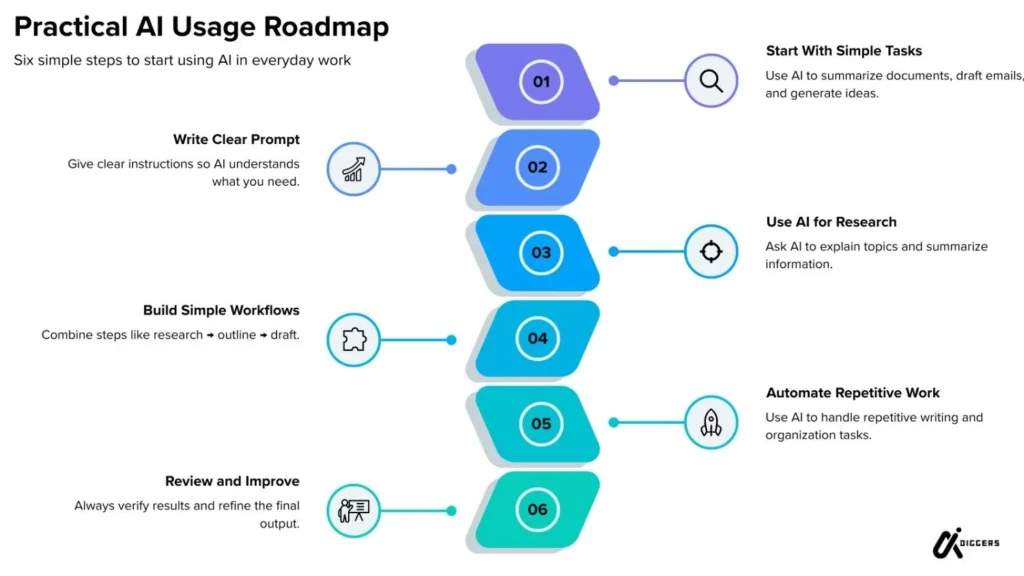
Learning to use AI effectively often starts with writing clear prompts.
A prompt is simply the instruction you give to an AI system.
The clearer your request, the more useful the response usually becomes.
Below are practical prompt examples that beginners can try immediately.
Research Prompts
AI can help explain topics or summarize information.
Example prompts:
“Explain the concept of machine learning in simple terms.”
“Summarize the main ideas from this article.”
“List the key benefits and limitations of renewable energy.”
These prompts help users quickly understand complex information.
Writing Prompts
AI can assist with drafting content or generating ideas.
Example prompts:
“Write a professional email requesting a project update.”
“Create five blog topic ideas about sustainable living.”
“Write a short introduction for a presentation about digital marketing.”
The generated content should always be reviewed and edited before use.
Productivity Prompts
AI can help organize tasks and improve productivity.
Example prompts:
“Create a daily schedule for someone working remotely.”
“Turn these notes into a structured task list.”
“List five ways to improve time management during the workday.”
These prompts help transform scattered information into organized plans.
Brainstorming Prompts
AI is also useful when you need creative ideas.
Example prompts:
“Give ten business ideas related to eco friendly products.”
“Suggest marketing strategies for a new online store.”
“List possible solutions to improve customer retention.”
These prompts are useful for exploring new ideas or directions.
Remember that AI suggestions should be treated as starting points for deeper thinking, not final answers.
Limitations of AI You Must Understand
AI can be extremely helpful. It can save time, generate ideas, and simplify complex tasks.
But it is important to understand one thing.
AI is not perfect.
Many beginners assume that AI always produces correct answers. That assumption can lead to mistakes.
Think of AI as a very fast assistant that works with patterns in data. It can provide helpful responses, but it still requires human judgment.
Understanding the limitations of AI is essential for using it responsibly.
AI Hallucinations and Accuracy Issues
One of the most discussed limitations of generative AI is something often called hallucination.
This happens when an AI system produces information that sounds correct but is actually inaccurate or unsupported.
For example, AI might:
Generate a citation that does not exist
Misinterpret a complex topic
Provide outdated information
This does not mean the system is intentionally misleading. It simply means the system is predicting responses based on patterns rather than verifying facts.
Because of this, important information should always be verified from reliable sources.
Especially when dealing with:
Academic research
Legal topics
Medical information
Financial decisions
Privacy Risks When Sharing Data
Another important consideration is privacy.
Many AI tools process the information that users provide in prompts. This means sensitive data should be handled carefully.
Examples of information that should usually not be shared with AI tools include:
Confidential client data
Personal identification information
Private company documents
Financial account details
Before using an AI platform for professional work, it is wise to review the service’s privacy policy.
Verify on the official page how the system stores and processes user data.
When AI Should Not Be Trusted
There are certain situations where AI should not be the primary source of information.
Examples include:
Medical advice
Legal decisions
Safety critical instructions
Financial investments
In these areas, AI can provide explanations or educational insights, but final decisions should rely on qualified professionals or verified documentation.
The Importance of Human Verification
The most effective way to use AI is to combine its speed with human judgment.
A practical approach often looks like this:
Step 1 Use AI to generate ideas or summaries.
Step 2 Review the output carefully.
Step 3 Verify key facts using trusted sources.
Step 4 Refine the final result.
When used this way, AI becomes a support tool rather than a replacement for expertise.
How to Evaluate AI Tools Before Using Them
Hundreds of AI tools appear every year.
Some focus on writing.
Some focus on automation.
Others specialize in research, coding, or marketing.
Choosing the right tool requires careful evaluation.
Instead of trying every new platform, it helps to apply a simple evaluation framework.
Features to Look For
The first step is understanding what the tool is designed to do.
Different AI systems specialize in different tasks.
For example:
Writing assistants help generate and edit content.
Research tools summarize information and analyze data.
Automation tools connect workflows between applications.
Before adopting any AI tool, ask a simple question.
Does this tool actually solve the problem I am trying to address?
Choosing tools based on real needs prevents unnecessary complexity.
Reliability and Accuracy
Accuracy is one of the most important factors when evaluating AI tools.
Some systems perform better in specific domains such as coding, writing, or data analysis.
Testing the tool with several examples can help measure reliability.
For example:
Ask the system to summarize a known article.
Request explanations for familiar topics.
Compare its responses with trusted sources.
If the results are inconsistent, the tool may not be suitable for important tasks.
Privacy Policies
Before using AI for professional work, always check the privacy policies of the platform.
Important questions include:
Does the system store user inputs?
Can prompts be used for training models?
Are there options for private data processing?
Verify these details on the official page of the tool.
This step is especially important for businesses handling sensitive information.
Integration Capabilities
Many advanced AI workflows involve connecting multiple tools together.
For example:
AI writing assistants connected to content management systems
Automation tools linked with CRM platforms
Research tools integrated with knowledge management systems
Tools that support integrations or API connections often allow more flexible workflows.
This makes it easier to scale AI usage across larger processes.
A Simple Framework to Start Using AI Today
Many people explore AI tools but never fully integrate them into their daily routines.
They try a few prompts, experiment briefly, and then return to their usual workflows.
The difference between casual use and real productivity improvement is having a clear framework.
Instead of randomly using AI, successful users follow a simple process.
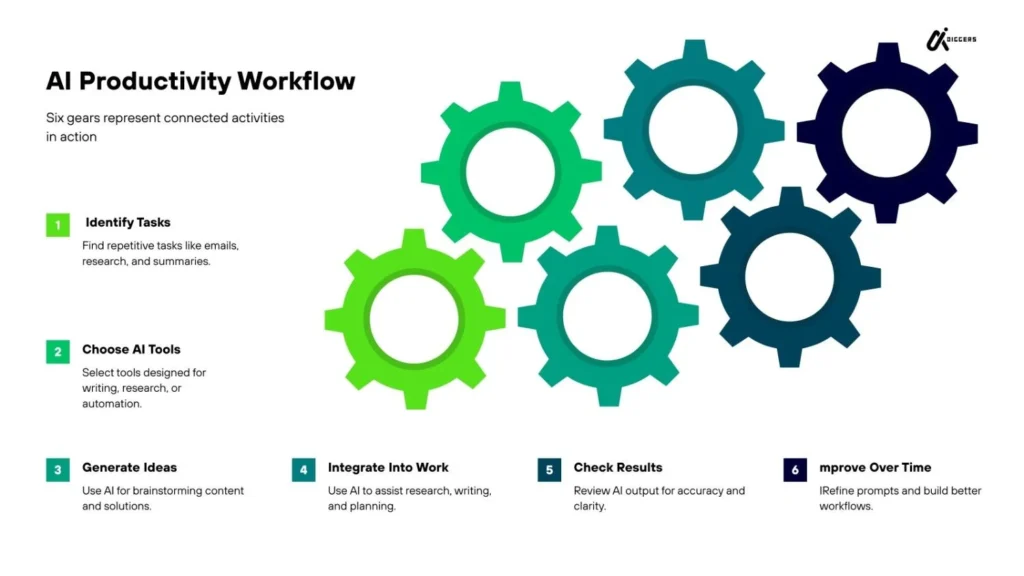
Step 1: Identify Repetitive Tasks
Start by observing your daily work.
Which tasks repeat frequently?
Examples often include:
Writing emails
Researching information
Creating outlines
Summarizing documents
Organizing notes
These types of tasks are ideal for AI assistance.
AI performs best when handling structured or repetitive activities.
Step 2: Choose the Right AI Tool
Different tools are designed for different purposes.
Some specialize in writing and communication.
Others focus on automation or data analysis.
Choosing the right tool depends on the type of task you want to improve.
For example:
Writing tasks may benefit from AI writing assistants.
Research tasks may benefit from AI research tools.
Automation tasks may require workflow automation platforms.
Start simple.
Choose one tool and learn how it works before adding more systems.
Step 3: Design a Simple Workflow
Once you have identified a task and selected a tool, create a simple workflow.
Example workflow for content writing:
Step 1 Generate topic ideas.
Step 2 Create a structured outline.
Step 3 Draft the initial content.
Step 4 Edit and refine the final version.
AI supports each stage, but the human user remains responsible for quality and accuracy.
Over time, these workflows can become faster and more efficient.
Step 4: Review and Improve the Process
The final step is reviewing how well the workflow works.
Ask questions such as:
Did AI reduce the time required for the task?
Did the results improve productivity?
Did the workflow introduce new challenges?
If the process works well, it can become part of your regular routine.
If not, adjustments can be made.
AI workflows often evolve gradually as users discover better prompts and more suitable tools.
Final Thoughts: How to Use AI
Artificial intelligence is often described as a revolutionary technology.
But for most people, its real impact appears in small daily improvements.
A student understands a difficult concept faster.
A freelancer writes proposals more efficiently.
A business owner organizes information more clearly.
These improvements may seem small individually, but they accumulate over time.
The most effective users of AI are not those who rely on it blindly.
They treat it as a tool that supports human thinking and creativity.
They verify important information.
They refine AI generated output.
They combine AI speed with human judgment.
When used this way, AI becomes more than a novelty.
It becomes part of a modern productivity system.
And as AI tools continue to evolve, learning how to use them responsibly and effectively will become an increasingly valuable skill.
FAQ about How to Use AI
What is the easiest way to start using AI?
The easiest way to start using AI is by using a general purpose AI assistant for simple tasks such as writing emails, summarizing information, generating ideas, or organizing notes. Begin with small tasks and gradually build more structured workflows.
Can beginners use AI tools without technical skills?
Yes. Most modern AI tools are designed with simple interfaces that allow users to interact through natural language prompts. This means beginners can use AI without programming or technical knowledge.
How is AI used in everyday life?
AI is commonly used for tasks such as writing assistance, research summaries, productivity planning, content creation, customer support automation, and idea generation.
What tasks can AI automate?
AI can help automate repetitive tasks such as summarizing documents, drafting emails, generating content outlines, organizing notes, analyzing data, and responding to common customer inquiries.
How do freelancers use AI tools?
Freelancers often use AI for proposal writing, brainstorming ideas, content creation, client communication, research assistance, and workflow automation to reduce time spent on administrative tasks.
How can students use AI for studying?
Students can use AI to summarize research papers, explain complex topics, generate practice questions, organize notes, and create structured study outlines.
Are AI tools always accurate?
No. AI systems may occasionally produce inaccurate or outdated information. Important facts should always be verified using reliable sources or official documentation.
Is it safe to share data with AI tools?
Users should be careful when sharing sensitive or confidential information with AI platforms. It is recommended to review the privacy policy of each tool and verify how user data is processed.
How do businesses use AI in daily operations?
Businesses use AI for customer support automation, marketing content generation, data analysis, workflow automation, and decision support.
What is an AI workflow?
An AI workflow is a structured process where AI tools assist with multiple steps of a task, such as research, content drafting, editing, and automation within a larger productivity system.
Refrence: Wikipedia, Google Scholar