
Introduction
A normal workday today is full of small tasks.
Emails arrive constantly.
Meetings appear on the calendar.
Notes are scattered across documents.
Messages come from multiple apps.
Most people are not struggling because they lack effort. They struggle because their work environment is fragmented.
Information is everywhere. Tasks pile up. Important work gets buried under small repetitive actions.
This is where AI tools for productivity are starting to change how people work.
Instead of manually organizing every task, AI tools can help sort information, summarize meetings, automate repetitive steps, and assist with writing or planning.
The goal of these tools is not to replace human thinking.
The goal is to remove friction from everyday work.
When used correctly, AI tools allow people to spend less time managing work and more time doing meaningful work.
In this guide, we will explore how AI productivity tools work, the types of tools available, and how to choose the right ones for your workflow.
We will also discuss their limitations, because AI tools are helpful but they are not perfect.
Understanding both the strengths and the limits will help you use them more effectively.
Why Productivity Feels Hard in Modern Work
Productivity used to mean completing tasks efficiently.
Today, productivity often means managing complexity.
Most professionals are not dealing with one type of task. Instead they juggle multiple responsibilities throughout the day.
A typical day might include:
writing emails
taking meeting notes
organizing project tasks
reviewing documents
responding to messages
planning upcoming work
None of these tasks are individually difficult. The difficulty comes from switching between them constantly.
Every time someone moves between tasks, their attention resets.
This constant switching creates mental fatigue and slows down progress.
Another challenge is information overload.
Documents, conversations, research, and notes are stored across many tools. Finding the right information at the right moment becomes difficult.
For example, a meeting might produce several important decisions. If the notes are not organized clearly, those insights can disappear inside long documents.
AI productivity tools try to solve this problem by acting as assistants that organize information and automate repetitive steps.
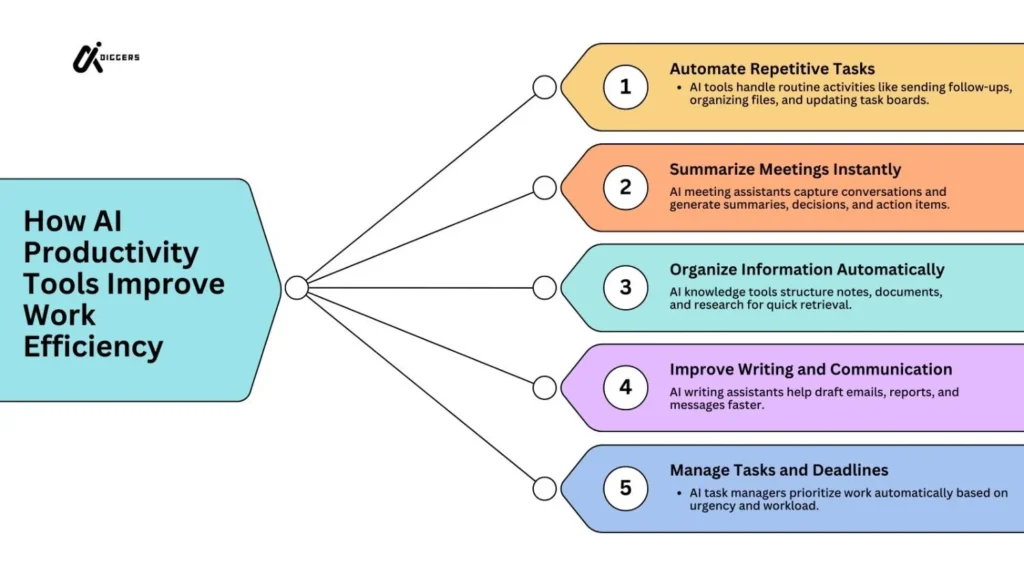
Some tools summarize meetings automatically.
Others help manage tasks or organize knowledge.
Some tools automate entire workflows between applications.
Instead of manually moving information between systems, AI tools can connect them and reduce repetitive work.
This shift allows professionals to focus more on decision making, creativity, and problem solving rather than administrative tasks.
How AI Tools Improve Productivity
AI productivity tools are designed to remove small but time consuming tasks from the workday.
Most professionals lose time not on complex work but on repetitive actions. Writing similar emails, organizing notes, scheduling meetings, and moving information between apps can consume hours every week.
AI tools help by reducing this friction.
Automating repetitive tasks
Many daily activities follow predictable patterns.
For example:
sending follow up emails
creating summaries after meetings
updating task boards
moving files between tools
AI powered automation tools can handle these actions automatically. Once a workflow is defined, the tool can perform the task without manual effort.
This reduces the number of small interruptions that break concentration during the day.
Organizing knowledge and information
Modern work generates large amounts of information.
Documents, research notes, meeting discussions, and project updates often live in different systems. Finding the right piece of information later can be difficult.
AI powered knowledge tools help organize this information.
They can summarize documents, highlight important points, and allow users to search across large collections of notes. Instead of scanning long pages of text, users can quickly locate the information they need.
Reducing time spent in meetings
Meetings are a major part of modern work, but they often create additional work afterwards.
Someone has to write notes, summarize decisions, and share action items with the team.
AI meeting assistants can automatically record conversations, generate summaries, and extract important tasks.
This allows participants to focus on the conversation instead of worrying about documentation.
Supporting faster writing and communication
Communication takes a large portion of the workday.
Emails, reports, proposals, and internal messages all require writing. AI writing assistants help by suggesting drafts, correcting grammar, and restructuring text for clarity.
These tools do not replace human judgment, but they can accelerate the drafting process.
Many professionals use AI writing assistants to create first drafts and then refine the final message themselves.
When combined, these improvements can save significant time across an entire workweek.
Instead of manually performing dozens of small tasks, professionals can rely on AI tools to handle routine work.
Categories of AI Productivity Tools
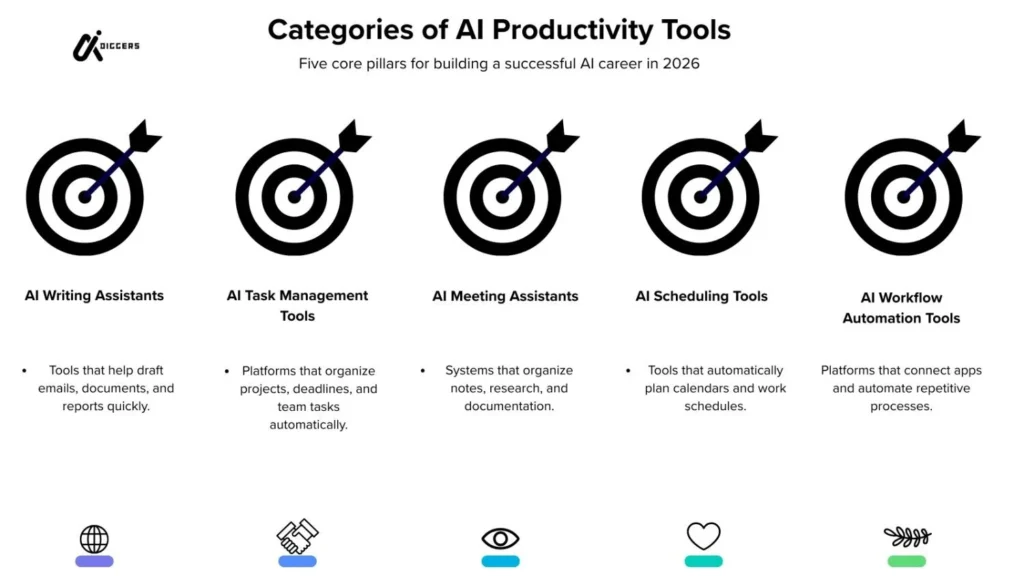
AI productivity tools are not all designed for the same purpose. Each category solves a different type of problem.
Understanding these categories makes it easier to choose tools that match your workflow.
AI task management tools
Task management tools help organize work and track progress.
Traditional task managers require users to manually update tasks, deadlines, and priorities. AI enhanced task managers analyze project activity and suggest priorities automatically.
Some tools can reorganize task lists based on deadlines or workload.
This helps teams stay focused on the most important work instead of constantly reorganizing project boards.
AI meeting assistants
Meetings generate valuable information but documenting everything manually can be difficult.
AI meeting assistants listen to conversations and automatically create meeting notes.
They often produce:
conversation summaries
key decisions
action items
speaker highlights
These summaries help teams quickly review meetings without reading long transcripts.
AI writing and communication tools
Writing tools powered by AI assist with drafting and improving written communication.
They can help with:
email responses
document drafting
grammar correction
tone adjustments
These tools are widely used by professionals who produce large amounts of written communication during their workday.
AI workflow automation tools
Many tasks involve moving information between different apps.
For example, when a form is submitted, a task might need to be created in a project manager and a notification sent to a team chat.
Automation tools connect multiple applications and execute these steps automatically.
AI enhancements allow these tools to handle more complex workflows and decision based actions.
AI scheduling and planning tools
Scheduling meetings and managing calendars can consume more time than expected.
AI scheduling tools analyze calendars and automatically find available meeting times. Some tools also plan daily schedules based on task priorities and deadlines.
Best AI Tools for Productivity
Many AI productivity tools exist today, but not every tool solves the same problem. Some tools help with writing, others manage tasks, and some automate entire workflows.
The tools below represent different categories of productivity assistance. Each one focuses on removing a specific type of friction from everyday work.
Before using any tool, it is always recommended to verify the latest features on the official product website because AI tools evolve quickly.
ChatGPT
ChatGPT is one of the most widely known AI assistants. It helps users generate ideas, draft text, summarize information, and answer questions.
Many professionals use ChatGPT as a writing and thinking assistant during their workday.
Common productivity uses include:
drafting emails
summarizing long documents
brainstorming ideas
generating outlines for reports
explaining complex topics
Instead of starting with a blank page, users can create a first draft quickly and then refine the content themselves.
Limitations
ChatGPT can occasionally generate incorrect information. Users should always review important outputs before using them in professional work.
Notion AI
Notion AI is built into the Notion workspace platform. It helps organize knowledge, write documents, and summarize information inside notes and project pages.
For people who store research, project documentation, or meeting notes in Notion, the AI features can accelerate many tasks.
Common productivity uses include:
summarizing meeting notes
turning rough notes into structured documents
generating task lists from written notes
creating content outlines
Because the AI is integrated directly into the workspace, users do not need to switch between multiple applications.
Limitations
Notion AI works best when information is already organized inside the platform. It may be less useful for people who do not use Notion as their main workspace.
Motion
Motion is an AI powered scheduling and task planning tool.
Instead of manually organizing a calendar, Motion automatically schedules tasks based on deadlines, priorities, and available time.
The system continuously adjusts the schedule when new tasks appear or when meetings change.
Common productivity uses include:
automatic calendar scheduling
task prioritization
deadline management
planning focused work blocks
For people who struggle to balance meetings with focused work time, automated scheduling can significantly reduce planning effort.
Limitations
Motion relies heavily on calendar integration. Users must keep their task lists and calendar updated for the system to work effectively.
ClickUp AI
ClickUp is a project management platform used by teams to track tasks and manage workflows. The AI features inside ClickUp assist with writing, summarizing updates, and organizing project information.
Teams often use ClickUp AI to reduce time spent documenting project activity.
Common productivity uses include:
writing task descriptions
summarizing project updates
creating meeting summaries
drafting project documentation
These features help teams maintain organized project records without spending excessive time writing reports.
Limitations
ClickUp can feel complex for new users because the platform includes many features beyond basic task management.
Otter.ai
Otter.ai focuses on meeting transcription and note creation.
The tool records conversations and converts spoken words into written text. It can also generate summaries and highlight key discussion points.
This reduces the need for manual note taking during meetings.
Common productivity uses include:
recording meeting conversations
generating meeting transcripts
highlighting key decisions
creating quick summaries
Meeting participants can focus on the discussion instead of writing notes.
Limitations
Accuracy can vary depending on audio quality and speaker clarity.
Fireflies.ai
Fireflies.ai is another AI meeting assistant designed to capture meeting insights.
It integrates with common video conferencing platforms and automatically records conversations.
The system then creates searchable transcripts and meeting summaries.
Common productivity uses include:
meeting transcription
action item tracking
team meeting summaries
conversation search
Teams can revisit important discussions without replaying entire meetings.
Limitations
As with most transcription tools, accuracy depends on the quality of the audio and background noise.
Grammarly
Grammarly is widely used for improving written communication.
Its AI powered suggestions help users correct grammar, adjust tone, and clarify sentences.
Professionals who write frequently benefit from faster editing and clearer communication.
Common productivity uses include:
grammar correction
sentence clarity improvement
tone suggestions for emails
editing documents quickly
Instead of reviewing text line by line, users receive suggestions in real time.
Limitations
Grammarly focuses on writing quality rather than broader workflow automation.
Zapier
Zapier is an automation platform that connects different apps and services.
Users create automated workflows that trigger actions between tools. For example, a new form submission can automatically create a task in a project manager and send a notification to a messaging app.
Recent AI integrations allow Zapier to create more advanced automation workflows.
Common productivity uses include:
automating repetitive processes
connecting multiple applications
moving data between tools automatically
triggering actions across systems
This reduces manual data entry and repetitive administrative work.
Limitations
Complex workflows can require careful setup to ensure they run correctly.
How to Choose the Right AI Productivity Tool
AI productivity tools can be powerful, but choosing the wrong tool often leads to confusion instead of efficiency.
The best tool is not the one with the most features. The best tool is the one that solves the specific problem you face during your workday.
Before selecting any AI tool, it helps to first understand where your time is being lost.
Identify your biggest productivity bottleneck
Many professionals adopt tools without clearly defining the problem they want to solve.
Start by asking a simple question.
Which activity consumes the most time in your workday?
Common answers include:
writing emails and documents
managing tasks and deadlines
organizing information and notes
taking meeting notes
moving information between tools
Once the bottleneck is clear, it becomes easier to choose a tool designed for that purpose.
For example, someone who spends hours writing documents may benefit from an AI writing assistant, while someone overwhelmed by meetings may benefit more from a meeting transcription tool.
Consider how the tool fits your workflow
A productivity tool should integrate smoothly into the tools you already use.
If a tool requires constant switching between platforms, it may actually reduce productivity instead of improving it.
Before adopting any tool, check whether it integrates with your existing workspace.
For example:
calendar tools should connect with your calendar
automation tools should connect with your apps
knowledge tools should store information in an organized structure
Tools that integrate with your workflow reduce friction and make automation more effective.
Evaluate ease of use
Complex tools often promise powerful features, but they can take time to learn.
If a tool requires extensive setup or training, the initial productivity gains may be delayed.
Many professionals prefer tools that are simple to adopt and provide immediate value.
Testing a tool with a small workflow first can help determine whether it fits your working style.
Review privacy and data considerations
AI tools often process documents, conversations, or project information.
Before using any tool for professional work, review how it handles data and where information is stored.
Organizations with sensitive data should carefully evaluate privacy policies and security practices before integrating AI tools into their workflow.
Verifying these details on the official website of the tool is recommended.
Start small and expand gradually
Instead of adopting multiple tools at once, begin with one tool that solves a clear problem.
Once the workflow becomes comfortable, additional tools can be added where necessary.
This gradual approach prevents tool overload and keeps productivity systems simple.
Common Mistakes When Using AI Productivity Tools
While AI tools can improve efficiency, many people experience the opposite effect because of how the tools are used.
Understanding common mistakes can help avoid unnecessary complexity.
Using too many tools at the same time
One of the most common mistakes is adopting too many productivity tools.
Each tool introduces a new interface, workflow, and set of notifications. When too many systems are used together, they can create additional mental overhead.
Instead of simplifying work, the tools create another layer of management.
A focused set of tools usually performs better than a large collection of disconnected apps.
Expecting AI to replace human judgment
AI tools are designed to assist, not replace decision making.
Writing assistants may help draft documents, but they still require human editing. Meeting tools may generate summaries, but important context should always be reviewed by the user.
Treating AI output as a first draft rather than a final result leads to better outcomes.
Automating processes that should remain manual
Automation is powerful, but not every workflow should be automated.
Some tasks require careful review or discussion between team members. Automating sensitive steps can introduce errors if conditions are not clearly defined.
Automation works best for repetitive and predictable tasks.
Ignoring tool setup and configuration
Many productivity tools require initial setup to perform effectively.
Skipping configuration often results in inaccurate outputs or incomplete automation.
Taking time to configure settings, integrations, and permissions can significantly improve how the tool performs.
Relying on AI without understanding the workflow
AI tools are most effective when users understand the workflow they are trying to improve.
Without clear processes, even advanced tools cannot produce meaningful results.
Productivity tools should support a structured workflow rather than replace it entirely.
Limitations of AI Productivity Tools
AI productivity tools can improve efficiency, but they are not perfect solutions. Understanding their limitations helps users apply them more effectively.
Many problems occur when people expect AI tools to solve every productivity challenge automatically.
Accuracy is not always guaranteed
AI systems generate responses based on patterns in data. This means the output may sometimes contain mistakes or incomplete information.
For example, a meeting summary might miss subtle context from the discussion. A writing assistant might generate sentences that sound correct but require editing.
For this reason, important outputs should always be reviewed before being used in professional communication or documentation.
AI works best as a support tool rather than a final authority.
Tools depend on good input
AI productivity tools rely heavily on the information provided by users.
If the input is unclear or incomplete, the results may also be weak. Clear instructions and well organized data help the system generate more useful outputs.
For example, when summarizing meeting notes, the quality of the transcript will influence how accurate the summary becomes.
Users often achieve better results by refining how they interact with the tool.
Privacy and data considerations
Many AI tools process documents, conversations, or internal project information.
Organizations working with confidential data should carefully review how tools store and process information.
Privacy policies and data handling practices can vary between platforms. It is always recommended to verify these details directly on the official website of the tool before using it for sensitive work.
Understanding how data flows through these systems helps reduce potential risks.
Automation can introduce hidden errors
Automation tools can connect multiple systems and move data automatically between applications.
While this saves time, incorrect workflow rules can create problems if errors occur silently in the background.
For example, a misconfigured automation might create duplicate tasks or send notifications to the wrong place.
Regularly reviewing automated workflows helps ensure that systems continue working as expected.
Over reliance on tools
Productivity tools should support human thinking, not replace it.
Some users become dependent on tools for every step of their workflow. When this happens, the tools may start controlling the process rather than assisting it.
Maintaining clear workflows and decision making processes ensures that AI tools remain helpful assistants rather than sources of complexity.
The Future of AI Productivity Tools
AI productivity tools are evolving rapidly as new models and automation capabilities emerge.
Over time, these tools are likely to become more integrated into everyday work environments.
Smarter digital assistants
Future productivity systems will likely behave more like intelligent assistants.
Instead of responding only to direct instructions, AI systems may monitor workflows and suggest improvements automatically.
For example, a system could recognize when a meeting ends and immediately generate a summary, update task boards, and notify relevant team members.
These assistants may eventually coordinate multiple tools behind the scenes.
Deeper integration across platforms
Many productivity challenges arise because information is scattered across different tools.
Future AI systems may reduce this fragmentation by connecting work environments more tightly.
Documents, meetings, project tasks, and communication channels could be linked together through shared AI systems.
This type of integration could allow professionals to move between tasks without manually transferring information.
Improved workflow automation
Automation is expected to become more intelligent over time.
Instead of following fixed rules, future automation systems may analyze patterns in how teams work and suggest more efficient processes.
For example, an AI system could observe repeated actions across projects and recommend automated workflows to reduce manual effort.
These improvements could allow professionals to focus more on strategic work rather than routine administration.
Personalized productivity systems
AI systems may eventually adapt to individual working styles.
Some people prefer structured task lists, while others work better with flexible planning methods.
Future productivity tools could analyze personal habits and adjust recommendations accordingly.
This level of personalization may help professionals create workflows that match their natural working patterns.
Key Takeaways
AI productivity tools are designed to reduce the time spent on repetitive work.
Instead of manually organizing tasks, writing notes, or summarizing meetings, these tools help automate many small activities that interrupt the workday.
The most useful productivity tools usually focus on specific tasks such as writing assistance, meeting summaries, workflow automation, or task management.
However, choosing the right tool requires understanding the problem you want to solve.
Adopting too many tools at once can create complexity rather than efficiency. Starting with one tool that solves a clear problem often produces better results.
It is also important to remember that AI tools are assistants. They can accelerate work, but they still require human review and judgment.
When used thoughtfully, AI productivity tools can reduce administrative workload and allow professionals to focus more on meaningful work.
FAQ
What are AI tools for productivity
AI productivity tools are software applications that use artificial intelligence to help users complete tasks more efficiently. These tools assist with activities such as writing, organizing information, managing tasks, summarizing meetings, and automating workflows.
What are the best AI tools for productivity
Some commonly used AI productivity tools include ChatGPT for writing and idea generation, Notion AI for knowledge organization, Motion for scheduling, ClickUp AI for project management assistance, and Zapier for workflow automation. Each tool focuses on different productivity tasks.
How do AI productivity tools save time
AI tools save time by automating repetitive tasks such as summarizing meetings, drafting documents, organizing notes, scheduling tasks, and connecting workflows between different applications.
Are AI productivity tools safe to use
Most productivity tools provide security and privacy information on their official websites. Users should review how the tool stores and processes data before using it for sensitive or confidential work.
Can AI replace productivity apps
AI tools usually enhance productivity apps rather than replace them. Many AI features are built directly into existing platforms such as project managers, writing tools, and workspace applications.
Do AI productivity tools work for teams
Yes. Many AI productivity tools are designed for team collaboration. They help teams manage tasks, summarize meetings, organize project information, and automate workflows across multiple users.
What are the limitations of AI productivity tools
AI tools may sometimes generate incorrect outputs or incomplete summaries. They also depend on accurate input data and proper configuration. Users should review outputs before using them in professional work.
How should beginners start using AI productivity tools
Beginners should start by identifying a specific task that consumes too much time. Choosing a single tool that solves that problem helps avoid tool overload and allows users to gradually build a productive workflow.
Refrence: Wikipedia, Google Scholar